Sunday, 7 May 2017

Enabling “Request for Other” option for End-User


In OIM 11gR2 PS3 normal end user doesn’t have capability to raise request for other user. By default they can only raise request for themselves. To enable the feature developer need to create a custom admin role with provision account capability and assign user to that role.
Below process will describe the scenario how to create the admin role for end user, so that they can raise request for Application and Entitlements.
  1. Login to identity self-service console using xelsysadm.
  2. Go to manage and click on Administration Roles.


3. Click on create

4. Provide name, Display Name and Description and click on Next


5. Click on Add Capabilities.


6. Select the below capabilities and click on Add Selected (you can also add other capabilities as per the requirements)
  1. Provision Account
  2. Revoke Account Entitlements
  3. View Provisioned Accounts
  4. View Accounts Entitlements
  5. Deprovision Accounts
  6. Disable Provisioned Accounts
  7. Enable Provisioned Accounts
  8. Grant Account Entitlements.


7. Click on Select to select all the capabilities.
8. Click on Next.
9. In the member page click on Add Rule.
10. Add the below rule by Expression (You can also change the rule as per the business need)
      
       User Type = EMP


11. Once the rule is selected, click on Next.
12. In the Scope Of Control page you can specify the Organization that can be managed by this admin role. If not you can simply skip this option and click on Next.

13. In the organization page select the organization which will publish that role. Once done click on Next.


14. Check the summary page and click on Finish.


15. New admin role has been created, and it is visible in the admin role list.


Assign user to Admin Role


1. In the identity self-service page go to Organization

2. Search and open the organization selected during the Admin role creation (To Publish the admin role).

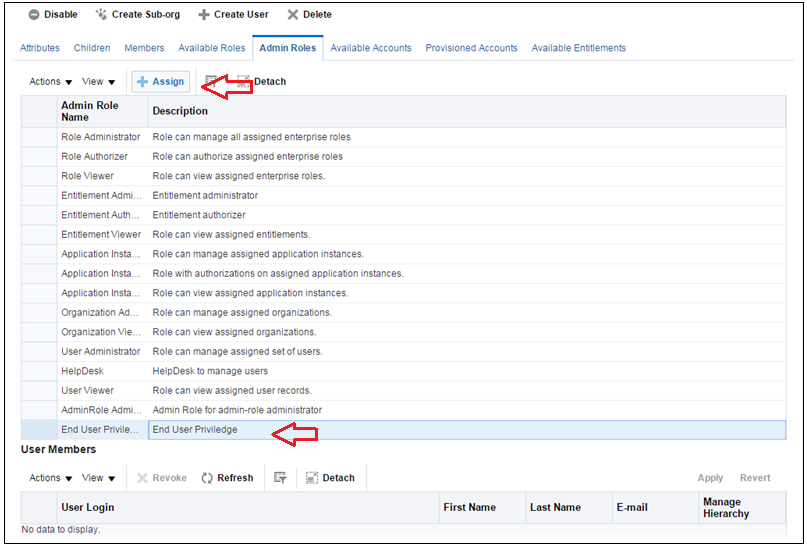
3. Click on the Admin Role tab.


4. Select the newly created Admin Role and click on Assign.


5. Select users you want add as a member of this admin role.


6. Once users are selected close the organization tab.
7. Logout from xelsysadm and login using normal user id.


8. Click on the Request Access you can find Request For Other is appearing


Upgrading OIM from PS1 to PS3

Here is the detail steps of upgrading OIM from PS1 (11.1.2.1) to PS3 (11.1.2.3) in a single instance. Also couple of bugs found during the upgrade process, details of the resolutions are also provided at the appendix.

Click here to get the PDF version

** Kindly post your further queries in the comments below.

Friday, 5 May 2017

OIM 11gR2 PS3 Revoke Requset using API

Revoke Application Instance request

public String createRevokeApplicationInstanceRequest(){
String requestKey="0";
RequestBeneficiaryEntity reqBenEnt = new RequestBeneficiaryEntity();
reqBenEnt.setRequestEntityType(oracle.iam.platform.utils.vo.OIMType.ApplicationInstance);
reqBenEnt.setEntitySubType("APP_INSTANCE_NAME"); //Application Instance Name as SubType
reqBenEnt.setOperation(RequestConstants.MODEL_REVOKE_ACCOUNT_OPERATION);
reqBenEnt.setEntityKey("ACCOUNT_ID"); //for AppInst it will be OIU key, for entitlement it will be ent_assign_key
List<RequestBeneficiaryEntityAttribute> reqBenEntAttrList = new ArrayList();
List<RequestBeneficiaryEntity> reqBenEntList = new ArrayList();
reqBenEntList.add(reqBenEnt);
//Create Beneficiary for the request
Beneficiary beneficiary = new Beneficiary();
beneficiary.setBeneficiaryKey("USR_KEY");
beneficiary.setBeneficiaryType(Beneficiary.USER_BENEFICIARY);
beneficiary.setTargetEntities(reqBenEntList);
List<Beneficiary> benList = new ArrayList<Beneficiary>();
benList.add(beneficiary);
//Create Request Data
RequestData reqData = new RequestData();
reqData.setBeneficiaries(benList);
reqData.setJustification("Business Justification");
OIMClient oimClientObjReq = OIMClientFactory.getOIMClient(requester);
RequestService reqAPI = (RequestService)oimClientObjReq.getService(RequestService.class);
try {
requestKey = reqAPI.submitRequest(reqData);
System.out.println(requestKey);
} catch (Exception rse) {
// TODO: Add catch code
rse.printStackTrace();
}
return requestKey;
}


Revoke Entitlement Request

public String createRevokeEntitlementRequest(){
String requestKey="0";
RequestBeneficiaryEntity reqBenEnt = new RequestBeneficiaryEntity();
reqBenEnt.setRequestEntityType(oracle.iam.platform.utils.vo.OIMType.Entitlement);
reqBenEnt.setEntitySubType("ENT_LIST_KEY");//it will be ent_list_key
reqBenEnt.setOperation(RequestConstants.MODEL_REVOKE_ENTITLEMENT_OPERATION);
reqBenEnt.setEntityKey("ENT_ASSIGN_KEY"); //It will be ent_assign_key which is entitlement instance key
List<RequestBeneficiaryEntityAttribute> reqBenEntAttrList = new ArrayList();
List<RequestBeneficiaryEntity> reqBenEntList = new ArrayList();
reqBenEntList.add(reqBenEnt);
//Create Beneficiary for the request
Beneficiary beneficiary = new Beneficiary();
beneficiary.setBeneficiaryKey("USR_KEY");
beneficiary.setBeneficiaryType(Beneficiary.USER_BENEFICIARY);
beneficiary.setTargetEntities(reqBenEntList);
List<Beneficiary> benList = new ArrayList<Beneficiary>();
benList.add(beneficiary);
//Create Request Data
RequestData reqData = new RequestData();
reqData.setBeneficiaries(benList);
reqData.setJustification("Business Justification");
OIMClient oimClientObjReq = OIMClientFactory.getOIMClient("REQUESTER_LOGIN_ID");
RequestService reqAPI = (RequestService)oimClientObjReq.getService(RequestService.class);
try {
requestKey = reqAPI.submitRequest(reqData);
System.out.println(requestKey);
} catch (Exception rse) {
// TODO: Add catch code
rse.printStackTrace();
}
return requestKey;
}


Revoke Role Request

For role revoke, it is almost same as Entitlement revoke request. Only changes required are as follows

reqBenEnt.setRequestEntityType(oracle.iam.platform.utils.vo.OIMType.Role);
reqBenEnt.setEntitySubType("ROLE_KEY");//it will be Role_key
reqBenEnt.setEntityKey("ROLE_KEY"); //It will be role_key
reqBenEnt.setOperation(RequestConstants.MODEL_REMOVE_ROLES_OPERATION);

OIM 11gR2 PS3 Provisioning Request using API

Provisioning request in OIM 11gR2 PS3 can be made for following:

1. Application Instance
2. Entitlements
3. Roles

Below are the API usage of all the request operations. You can use this sample methods and modify accordingly for bulk operations.

Application Instance Provisioning Request


/**
* Requesting Application Instance. This method
* can be further modified to use for bulk action.
* @param args
*/
private String createApplicationRequest() throws Exception{
RequestBeneficiaryEntity requestEntity = new RequestBeneficiaryEntity();
requestEntity.setRequestEntityType(oracle.iam.platform.utils.vo.OIMType.ApplicationInstance); //Type of the Request
requestEntity.setEntitySubType("APP_INSTANCE_NAME"); //Name of the Application Instance
requestEntity.setEntityKey("APP_INSTANCE_KEY"); //Application instance key
requestEntity.setOperation(RequestConstants.MODEL_PROVISION_APPLICATION_INSTANCE_OPERATION); //Request operation type.
/**
* here in each RequestBeneficiaryEntityAttribute object we will
* be setting the request data
* FIELD_1,FIELD_2,FIELD_3 are the request data set filed label name and the "value" is the corresponding value.
*/
List<RequestBeneficiaryEntityAttribute> attrs = new ArrayList<RequestBeneficiaryEntityAttribute>();
RequestBeneficiaryEntityAttribute attr;
attr = new RequestBeneficiaryEntityAttribute("FIELD_1", "value", RequestBeneficiaryEntityAttribute.TYPE.String);
attrs.add(attr);
attr = new RequestBeneficiaryEntityAttribute("FIELD_2", "value", RequestBeneficiaryEntityAttribute.TYPE.String);
attrs.add(attr);
attr = new RequestBeneficiaryEntityAttribute("FIELD_3", "value", RequestBeneficiaryEntityAttribute.TYPE.String);
attrs.add(attr);
//Continue setting RequestBeneficiaryEntity
requestEntity.setEntityData(attrs);
//Adding RequestBeneficiaryEntity to List
List<RequestBeneficiaryEntity> entities = new ArrayList<RequestBeneficiaryEntity>();
entities.add(requestEntity);
//creating new Beneficiary
Beneficiary beneficiary = new Beneficiary();
beneficiary.setBeneficiaryKey("USR_KEY"); //set BeneficiaryKey as User key
beneficiary.setBeneficiaryType(Beneficiary.USER_BENEFICIARY); //set the type as user
beneficiary.setTargetEntities(entities); //set target entities as list of RequestBeneficiaryEntity
//Adding Beneficiary to List
List<Beneficiary> beneficiaries = new ArrayList<Beneficiary>();
beneficiaries.add(beneficiary);
//Creating new RequestData and set the Beneficiaries with List of Beneficiaries
RequestData requestData = new RequestData();
requestData.setBeneficiaries(beneficiaries);
/**
* getRequesterConnection() is a seperate method to create OIM connection.
*/
OIMClient oimClientObjReq = getRequesterConnection("REQUESTER_LOGIN_ID"); //create an OIM connection with requester's login
RequestService requestAPI = (RequestService)oimClientObjReq.getService(RequestService.class);
String requestId = requestAPI.submitRequest(requestData);
System.out.println("requestId: "+requestId);
return requestId;
}

Entitlement Provisioning Request


private String createEntitlementRequest() throws Exception{
/**
* Creating a new RequestBeneficiaryEntity object which
* will hold all the requested entitlement related data.
*/
RequestBeneficiaryEntity requestEntity = new RequestBeneficiaryEntity();
requestEntity.setRequestEntityType(oracle.iam.platform.utils.vo.OIMType.Entitlement); //Type of the Request
requestEntity.setEntitySubType("ENT_CODE"); //Name of the Entitlement
requestEntity.setEntityKey("ENT_LIST_KEY"); //Entitlement key
requestEntity.setOperation(RequestConstants.MODEL_PROVISION_ENTITLEMENT_OPERATION); //Request operation type.
//Adding RequestBeneficiaryEntity to List
List<RequestBeneficiaryEntity> entities = new ArrayList<RequestBeneficiaryEntity>();
entities.add(requestEntity);
//creating new Beneficiary
Beneficiary beneficiary = new Beneficiary();
beneficiary.setBeneficiaryKey("USR_KEY"); //set BeneficiaryKey as User key
beneficiary.setBeneficiaryType(Beneficiary.USER_BENEFICIARY); //set the type as user
beneficiary.setTargetEntities(entities); //set target entities as list of RequestBeneficiaryEntity
//Adding Beneficiary to List
List<Beneficiary> beneficiaries = new ArrayList<Beneficiary>();
beneficiaries.add(beneficiary);
//Creating new RequestData and set the Beneficiaries with List of Beneficiaries
RequestData requestData = new RequestData();
requestData.setBeneficiaries(beneficiaries);
/**
* getRequesterConnection() is a seperate method to create OIM connection.
*/
OIMClient oimClientObjReq = getRequesterConnection("REQUESTER_LOGIN_ID"); //create an OIM connection with requester's login
RequestService requestAPI = (RequestService)oimClientObjReq.getService(RequestService.class);
String requestId = requestAPI.submitRequest(requestData); //Return request ID
System.out.println("requestId: "+requestId);
return requestId;
}


Role Provisioning Request


private String createRoleRequest() throws Exception{

/**
* Creating a new RequestBeneficiaryEntity object which
* will hold all the requested Role related data.
*/

RequestBeneficiaryEntity requestEntity = new RequestBeneficiaryEntity();
requestEntity.setRequestEntityType(oracle.iam.platform.utils.vo.OIMType.Role); //Type of the Request
requestEntity.setEntitySubType("UGP_KEY"); //Name of the Role
requestEntity.setEntityKey("UGP_NAME"); //Role key
requestEntity.setOperation(RequestConstants.MODEL_ASSIGN_ROLES_OPERATION); //Request operation type.

//Adding RequestBeneficiaryEntity to List
List<RequestBeneficiaryEntity> entities = new ArrayList<RequestBeneficiaryEntity>();
entities.add(requestEntity);

//creating new Beneficiary
Beneficiary beneficiary = new Beneficiary();
beneficiary.setBeneficiaryKey("USR_KEY"); //set BeneficiaryKey as User key
beneficiary.setBeneficiaryType(Beneficiary.USER_BENEFICIARY); //set the type as user
beneficiary.setTargetEntities(entities); //set target entities as list of RequestBeneficiaryEntity

//Adding Beneficiary to List
List<Beneficiary> beneficiaries = new ArrayList<Beneficiary>();
beneficiaries.add(beneficiary);

//Creating new RequestData and set the Beneficiaries with List of Beneficiaries
RequestData requestData = new RequestData();
requestData.setBeneficiaries(beneficiaries);

/**
* getRequesterConnection() is a seperate method to create OIM connection.
*/

OIMClient oimClientObjReq = getRequesterConnection("REQUESTER_LOGIN_ID"); //create an OIM connection with requester's login
RequestService requestAPI = (RequestService)oimClientObjReq.getService(RequestService.class);
String requestId = requestAPI.submitRequest(requestData); //Return request ID

System.out.println("requestId: "+requestId);
return requestId;
}


Thursday, 4 May 2017

SOA Composite Build failed due to Java Heap Space issue

Problem Description:

Some time you may face the below issue while deploying SOA composite from JDeveloper. I faced the same issue using Jdevelper 11.1.1.6.

The issue says that the compiler couldn't create the jvm.

Issue may happen if you have an internal weblogic server integrated with your JDeveloper IDE. And you do not need weblogic to run while deploying SOA composites to SAR file.

Resolution:

open the [MIDDLEWARE_HOME]\jdeveloper\bin\ant-sca-compile.xml file. and change the jvmarg value as below.

Previous:


 After:


After changing the ant-sca-compile.xml , open the jdev.conf file located at [MIDDLEWARE_HOME]\jdeveloper\jdev\bin and change as below

comment the line "AddVMOption  -XX:MaxPermSize=256M" and add the below 3 lines

AddVMOption –Xmx1280M
AddVMOption -XX:MaxPermSize=256M
AddVMOption -XX:MaxHeapSize=512M


Save the file and redo the deployment again. Now this time it is successful.


Followers

OIM API for adding process task and retry failed task

 In this blog you can find how to add new process task and retry any failed/rejected tasks using API. Adding new process task: /************...